Keep client, site, asset, training, and report records in one place so field teams and office staff work from the same facts without rebuilding files after visits.
Cleaner Site Records
Capture inspection notes, photos, signatures, and deficiencies once, then carry them into reports, quotes, invoices, and account follow-up with less office cleanup.
Less Duplicate Entry
Track due dates, service intervals, renewals, and technician qualifications so routine compliance work does not depend on memory or a private spreadsheet.
Recurring Work Control
Move field results into client-ready reports faster, with clear evidence, deficiencies, photos, and next steps already tied to the account and site for delivery.
Faster Report Turn


Systems Customized to Meet Your Needs
Your system should be built around the way compliance vendors actually run:
Market Trust & Visibility - clarify services, credentials, industries served, proof points, and paths to request help.
Lead & Account Intake - capture client, site, asset, urgency, scope, renewal, document, and contact details.
Recurring Work & Renewals - manage service intervals, contract cycles, inspection due dates, and renewal touchpoints.
Site Scheduling & Assignment - assign work by location, certification, cadence, priority, and client need.
Field Evidence & Forms - guide checklists, photos, signatures, deficiencies, corrective actions, and closeout notes.
Client Communication - send confirmations, report delivery, deficiency updates, quotes, and renewal reminders.
Records & Compliance History - track training proof, SDS files, OSHA logs, certificates, reports, and prior service.
Reporting & Account Growth - show open issues, completed work, overdue items, recurring revenue, and client follow-up.
Top Ten Points of Failure for Safety & Compliance Vendor Systems
1. Disconnected records, forms, and billing
Owners say their work is often spread across CRM tools, spreadsheets, PDFs, web forms, billing systems, and email. When records are split this way, the office rebuilds the same job several times before the client receives a clean report or invoice.
2. Recurring work falls out of view
Managers indicate that service intervals, inspection cycles, training renewals, and contract dates become hard to control once the client base grows. Work can be technically sold and still missed when the system does not surface what is due next.
3. Duplicate field-to-office entry
Field teams capture notes, photos, signatures, deficiencies, and measurements, then office staff retype the same information into reports, quotes, invoices, or client portals. Vendors report that this repeat entry slows delivery and raises error risk.
4. Weak site and asset history
Operators describe filing cabinets, scattered PDFs, and clunky platforms that make prior service records hard to find. Without site, asset, device, or training history in one view, field staff lose time and clients get slower answers.
5. Forms do not match the real rule set
Inspection and compliance work often changes by client, site, jurisdiction, AHJ, or service line. Teams say rigid templates miss the mark because one generic form cannot cover every local requirement, deficiency type, or evidence standard.
6. Mobile capture is too clunky
Field users ask for low-friction mobile entry, Android-friendly access, fast photo capture, signatures, and simple status updates. When the field app is slow or awkward, the office inherits messy notes and late reports.
7. Recurring billing and contract control break down
Owners with preventive maintenance, inspections, or long-term service agreements describe recurring billing as a major pain point. Contract terms, completed work, open deficiencies, and invoice triggers need to stay tied together.
8. Training and OSHA records overwhelm small teams
Managers indicate that training dates, trainer names, worker records, incident logs, SDS access, and electronic submission duties can sit on one person. A weak record system turns compliance service delivery into manual file chasing.
9. Dashboards miss the exceptions
Reviewers and operators often ask for better filtering, reporting, and trend visibility. Leaders need to see overdue inspections, missing reports, open deficiencies, renewal risk, and staff workload without digging through every account.
10. Enterprise tools feel too heavy for smaller vendors
Small vendors say many platforms are too expensive, too rigid, or built around enterprise assumptions. They need a system that fits actual routes, forms, clients, and handoffs without forcing the team into a workflow they will avoid.
Here's How We Address These Issues

Account Intake
• Centralizes client, site, asset, contact, and service-scope details
• Separates urgent requests, recurring work, audits, and training needs
• Captures documents, photos, prior reports, and special requirements early
• Flags missing information before field work is scheduled
• Reduces preventable callbacks, wrong forms, and office cleanup

Schedule Control
• Tracks inspection cycles, renewal dates, training deadlines, and service intervals
• Assigns work by location, certification, priority, and account requirements
• Shows scheduled, overdue, waiting, completed, and reported work
• Gives managers a clear view without relying on memory or scattered spreadsheets
• Helps recurring contracts stay visible as the client list grows

Field Evidence
• Gives field staff simple checklists, forms, photos, signatures, and issue capture
• Supports client-specific, site-specific, and jurisdiction-aware workflows
• Ties deficiencies, corrective actions, and notes to the right account and site
• Reduces duplicate entry between field notes and final reports
• Creates cleaner records for clients, office staff, and future visits

Record Protection
• Organizes training records, incident details, SDS files, reports, and certificates
• Keeps proof of service tied to clients, sites, assets, and dates
• Makes prior work easier to find before audits, renewals, or client questions
• Supports documented handoffs between field teams and office staff
• Reduces risk from loose files, old PDFs, and private spreadsheets

Renewal Engine
• Tracks contracts, recurring billing triggers, renewals, and open account opportunities
• Turns deficiencies and failed items into follow-up tasks or quotes
• Sends timely reminders before reports, renewals, or reinspection dates slip
• Helps account managers maintain client relationships after service is complete
• Connects operational follow-up to retention and repeat revenue

Growth Backbone
• Keeps tools practical for smaller teams, field users, and back-office staff
• Builds owner dashboards around exceptions and operating priorities
• Connects website inquiries, referrals, account requests, and booked work
• Supports hiring, onboarding, SOPs, and role clarity as the vendor grows
• Creates a steadier operating model for more clients, sites, and service lines

Site Schedule View
Recurring work, site assignments, certification fit, due dates, and field status without chasing every technician, inspector, or specialist.

Evidence & Records View
Client-ready forms, photos, training proof, SDS files, deficiencies, and certificates organized by account, site, asset, and due date.

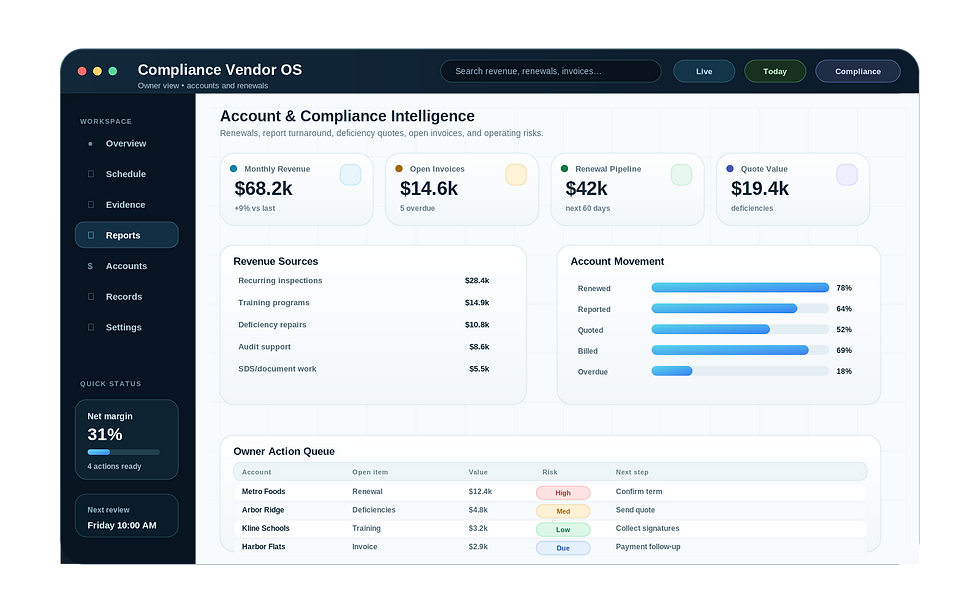
Account & Compliance Intelligence
Revenue, renewals, overdue deficiencies, report turnaround, open invoices, and service risks in one owner-ready view.